Latest
Showing posts with label blogging. Show all posts
Friday, 29 August 2014
Soon HTML,JAVA,CSS and many more for you.
Labels:
blogging
,
css
,
html
,
java
,
learning scripting languages
,
php
,
scripting languages
,
site building
Tuesday, 13 May 2014
How to make a Blog using Wordpress in 9 Steps
Here is the full description of making a Wordpress blog in 7 steps. As in my previous post i have described how to make a blog using Blogger platform. Keep in mind that we have a basic need of making a blog to share our views and we must have an audience to listen to us. So why am i telling all this? This is because we need to understand the features if Wordpess that we consider over Blogger. The main difference between Wordpress and blogger platform is its plugins as these plugins help a blogger a lot as we have many SEO plugin's available for optimising our each and every blog post to perform well and reach it's required audience.
So here are the steps in which you can make a Wordpress free blog easily.
9 Steps to make a Free Wordpress Blog.
Step 1: Go to
Wordpress.com and click on Get Started button.
![]() |
| Step :1 |
Note :Click on the images to view in full size.
Step 2: Get
started with Wordpress :-
Enter your email address ,user name that you want and password for your blog account ,then enter the blog name or address of your blog i.e that will be followed by wordpress.com eg. Yourblogname.wordpress.com
![]() |
| Step 2: Form fill up |
![]() |
| Step 2: Create blog |
Enter your email address ,user name that you want and password for your blog account ,then enter the blog name or address of your blog i.e that will be followed by wordpress.com eg. Yourblogname.wordpress.com
Enter the web
address you want in the field where I had written your blogname.
Then scroll to
the bottom of the screen and click on the button Create blog.
Enter your blog name in the first field and in the another field enter description of your blog. Then click on next.
Step 4: Theme
Selection :
Select a best
suited theme form the themes provided by wordpress then cick on next.
Step 5: Customize
your theme or just click on next step.
Step 6: Share your blog on social networks i.e facebook and twitter.
![]() |
| Step 6 : Share On Social Network |
Step 7: Write
your first post
Give your post a
title in the top most box and then write your post in the content box below it
.You can insert images to your post by clicking on the insert photo button next
to title box.
![]() |
| confirm email |
Note :But before you get start posting you just have to verify your
mail address by just signing in to your mail account and opening the mail from
wordpress and clicking on the link given in it.
Step 8: See Your Dashboard
After conformation of your account you can accsess the dashboard of wordpress in which you will find all the stuff that are needed, here you will see the posts tab in the side menu by clicking on it you can see all your posts those are either saved as draft or are published you can see all these here. Here you can publish your unpublished post that we had made in the 7'th step.
![]() |
| Step 8 :Dashbord |
After conformation of your account you can accsess the dashboard of wordpress in which you will find all the stuff that are needed, here you will see the posts tab in the side menu by clicking on it you can see all your posts those are either saved as draft or are published you can see all these here. Here you can publish your unpublished post that we had made in the 7'th step.
Step 9: View your blog and your post after you are done with making the posts by entering your web address that you had opt for in the step 2. in a new tab .
So these were the 9 steps in which you can start a free wordpress blog. Hope you all are clear in making a wordpress blog for free.If you have any doubt regarding these steps feel free to ask any question in the comment box given below.
Labels:
blog
,
blogging
,
create wp blog
,
free wordpress blog
,
maikg a new wordpress blog
,
new blog
,
new wordpress blog
,
wordpress blog
Wednesday, 30 April 2014
Make a Blogger blog in 7 easy steps
Making a blogger blog is very easy and it can be made in 7
easy steps.
I will describe it with the help of pictures for the ease of
understanding so. Here are the following 7 steps that would make you understand
that how to make a blog on Blogger platform and you can try making it yourself.
What is a Blogger platform?
Blogger platform is a platform for blog provided by Google
so that making of blog becomes easy and more and more people can make a blog as
it is available for free . It is a CMS content management software available
online to manage a blog. You can have your desired blog name and can you can
get your own blogs url or web address for free but it will be followed by the
bloggers extinction that is .blogspot.com. For e.g. you are making a blog with
xyz url then your url will be www.xyz.blogspot.com .
Creating a Blogger blog step by step in 7 easy steps.
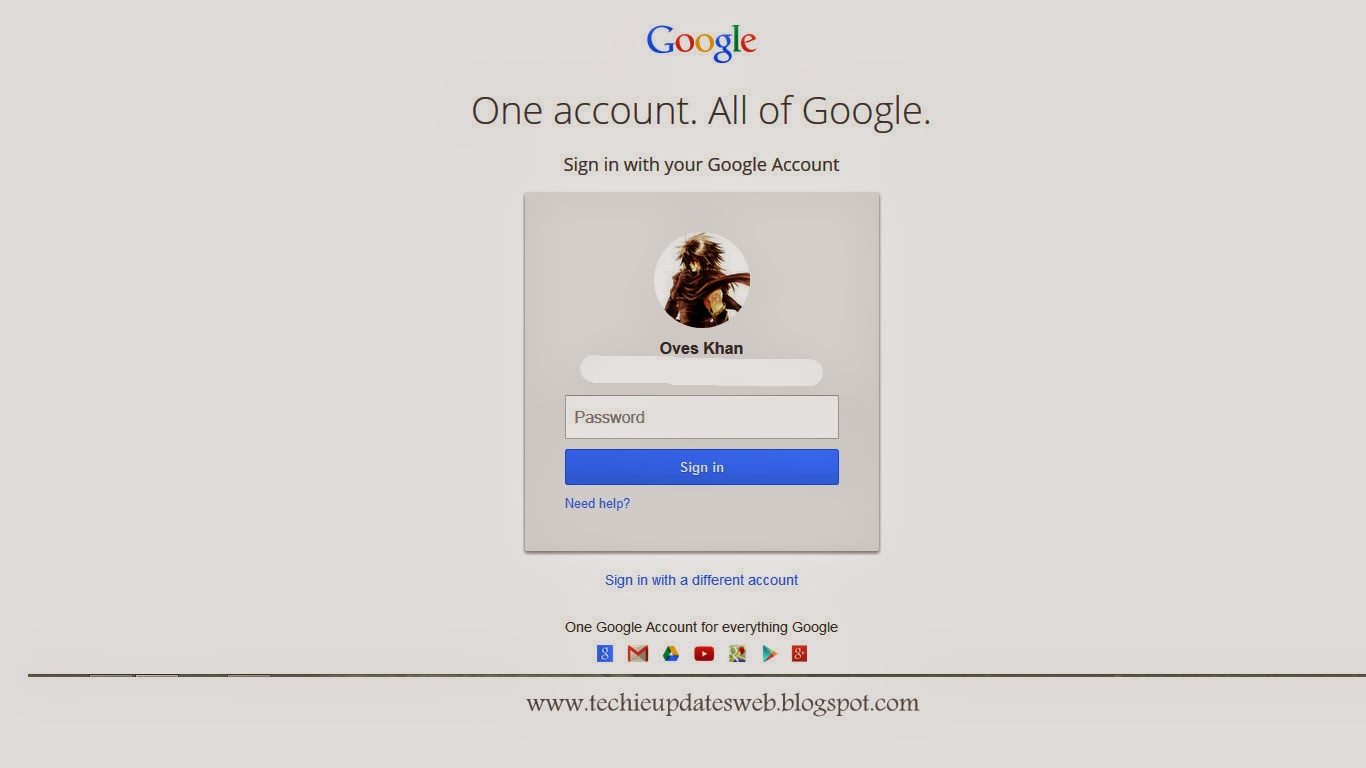
Step 1: Sign in
with one of your Google account on Blogger.
![]() |
| Step 1:Sign in |
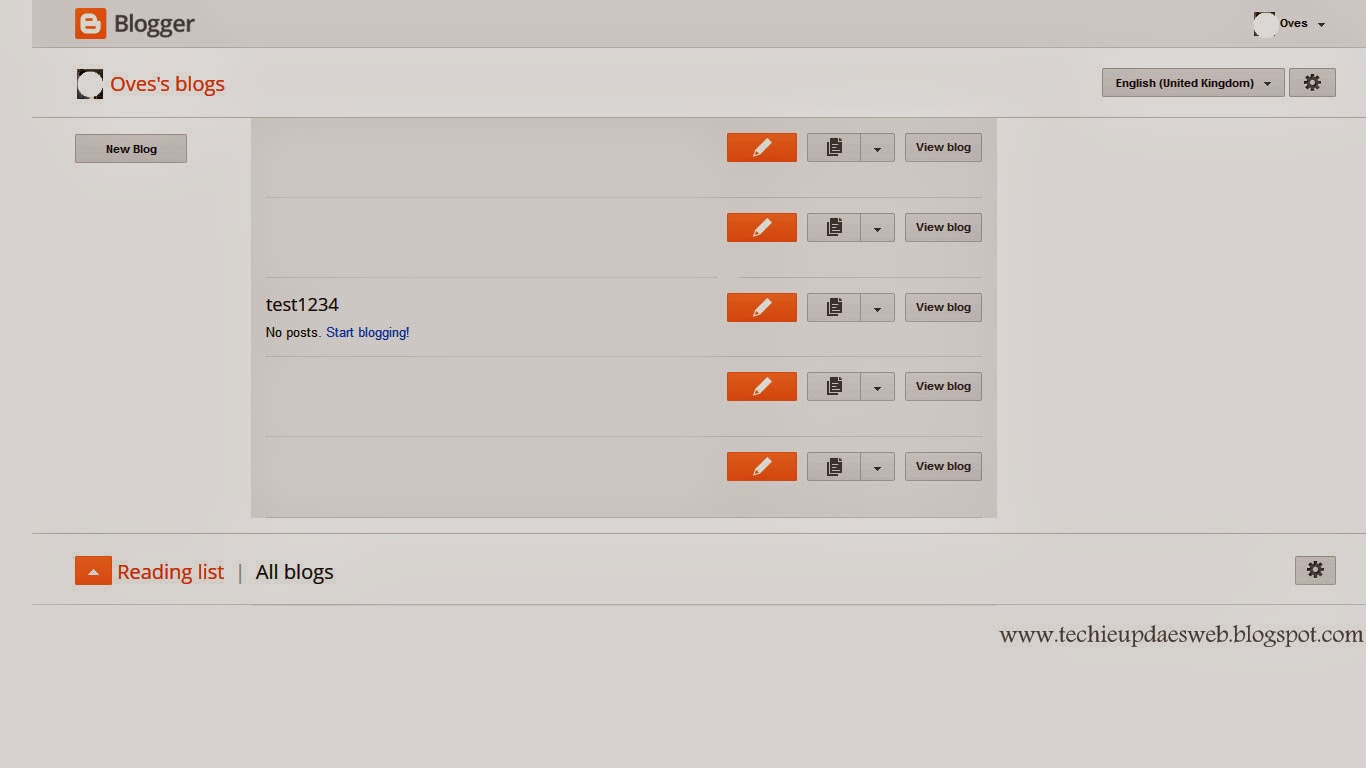
Step 2: On
signing up follow the instructions and finally when you reach the dashboard of
your account you can see an option to create a new blog on the left hand side
of your screen.
![]() |
| Click on Create new blog |
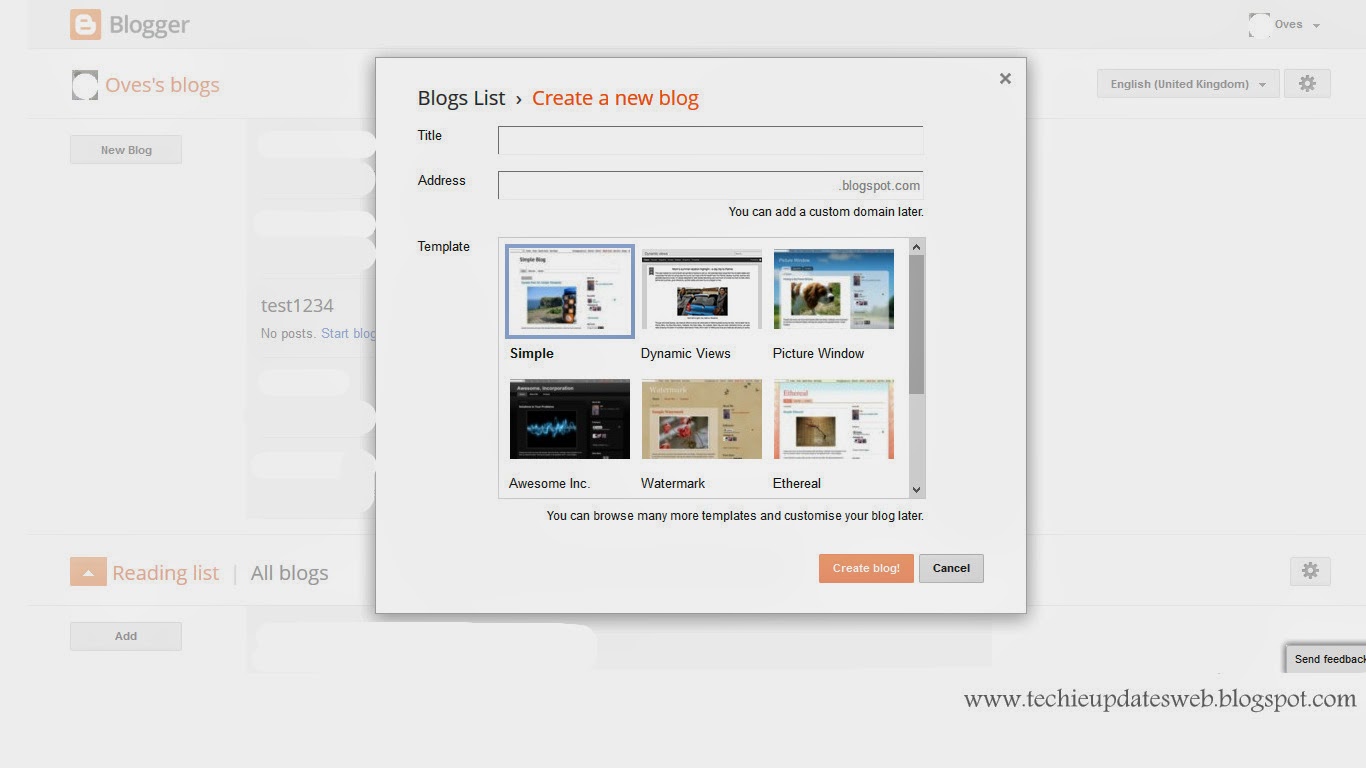
Step 3: A form named
‘Create a new blog’ will open that you have to fill with the required information.
![]() |
| New blogs form. |
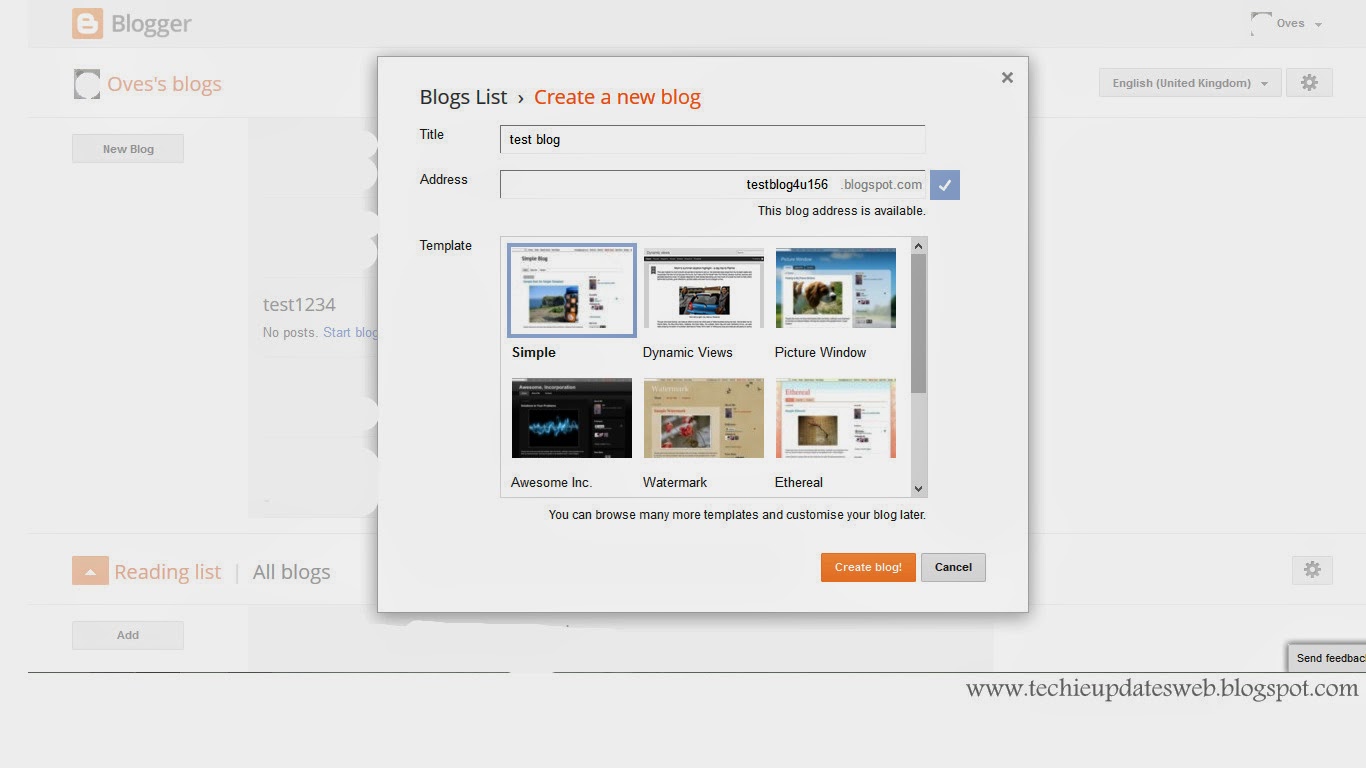
Step 4: You have
to insert a blogs name that you want to make and insert the url you want for
your blog and then choose a template for your blog. Template is a look to your
blog that how your blog will appear, you can say it as the theme of your blog.
Then click on Create Blog.(You can change your blog name and url even after you
have created it.)
![]() |
| Fill the information's. |
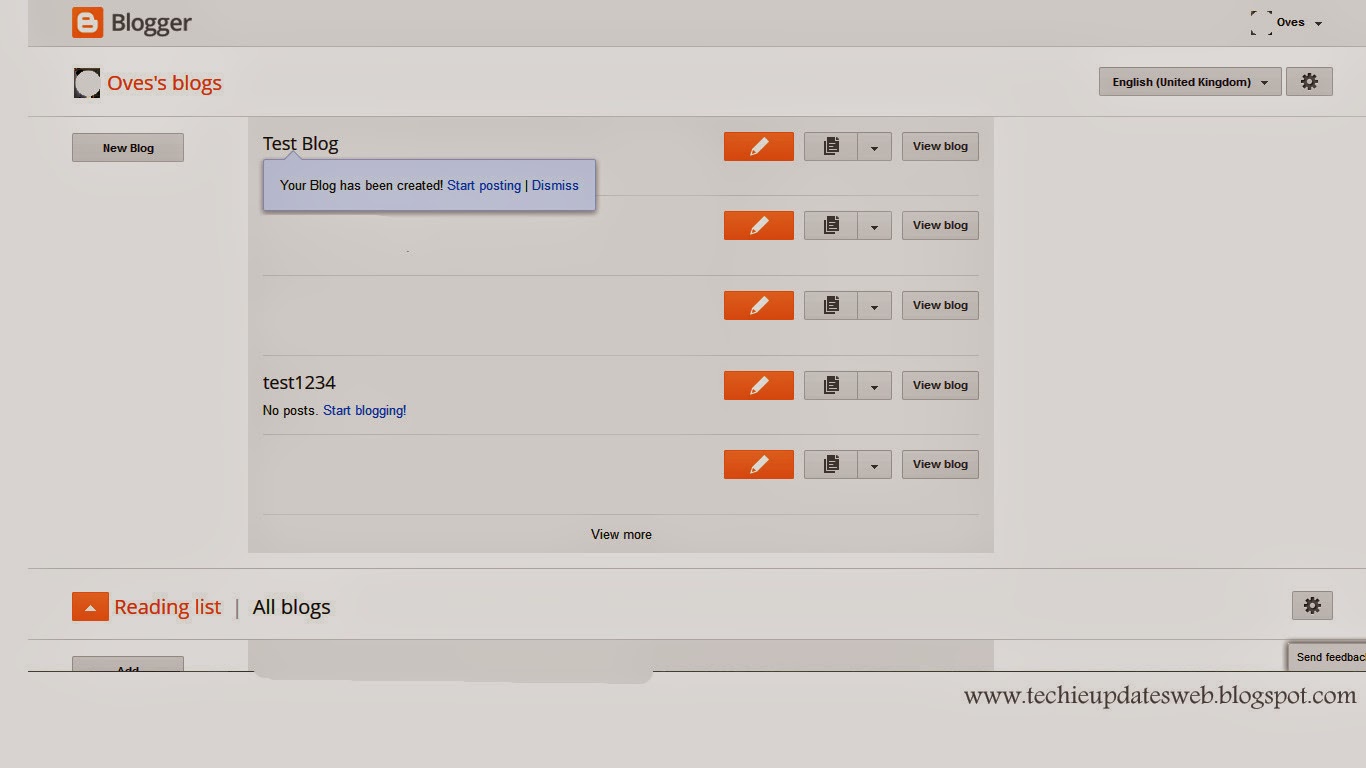
Step 5: After that
your has been created you will again be taken to the dashboard of your blogger
account then see your blog name with the massage that your blog has been
created and two options will be given to you that is Start posting and dismiss
click on start posting for creating a new post.
![]() |
| Start posting. |
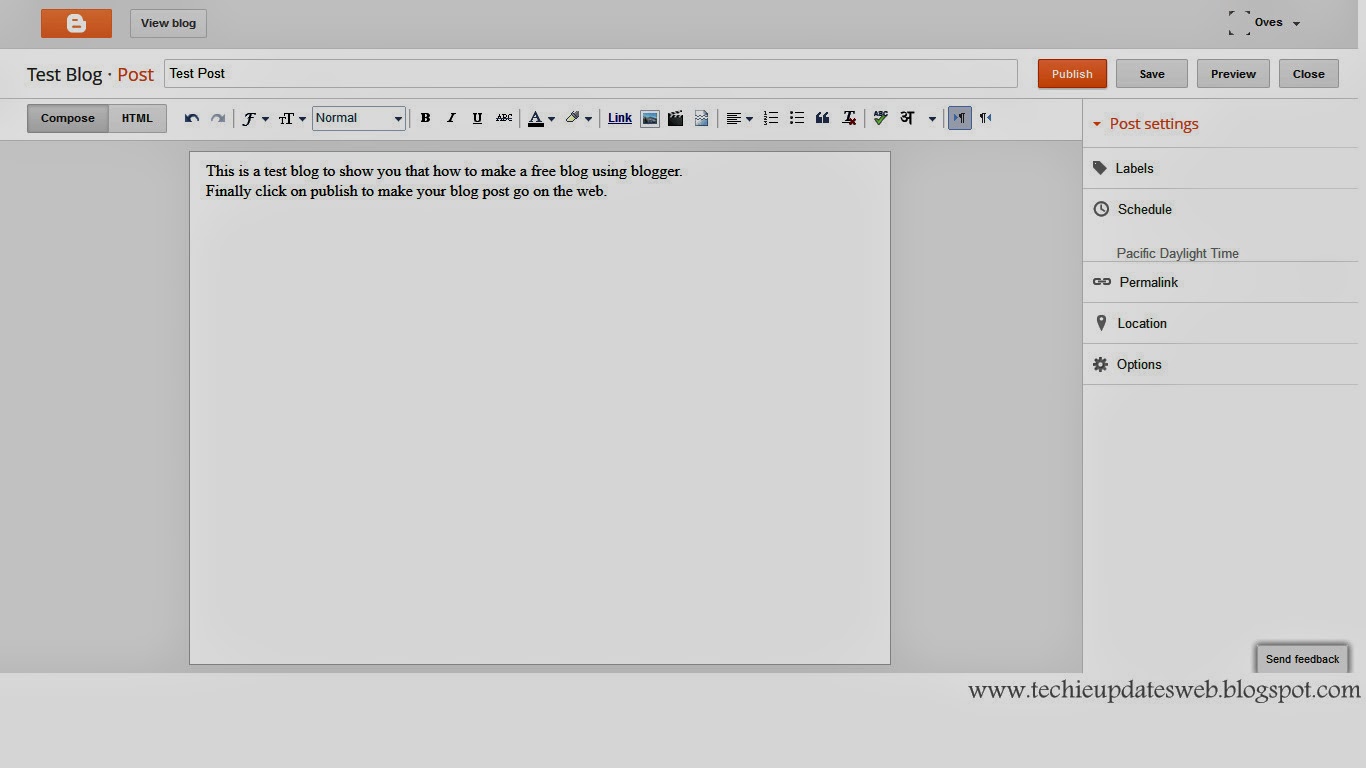
Step 6: After you
have clicked on start posting then a new post window will open where you can
start posting with a title on the top where I had written ‘Test Post’ and the
main content in the lower area that is empty area where I had written ‘This is
the test post….’. Then click on preview button on the upper right of your
screen to see how your post will look after publishing if you are satisfied with
your post then you can click on publish post and here you go!!! Your post has
been published.
![]() |
| Create new post |
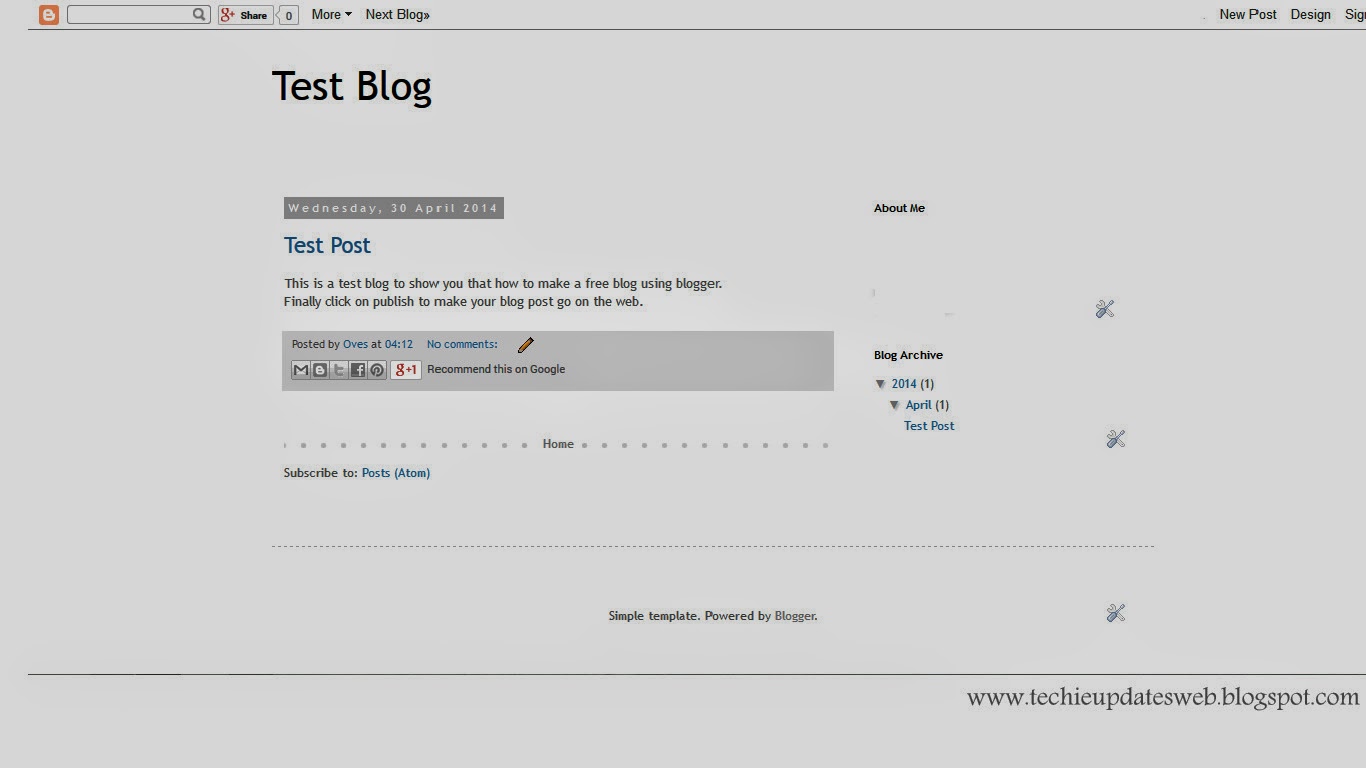
Step 7: After you
had published a window will open where you can see the posts of your blog and
on the top of the screen you will see a button ‘view blog’ click on it to see
your blog with the post published.
![]() |
| See your blog. |
And for posting more posts follow the 5 to 7 steps again and
you can add new posts to your existing blog.
Note: In the 5’Th step I had
mentioned about an option of start posting instead of that you will find an
option of create a new post. The button of create a new post is just on the
right side of your blog name it has a pen picture on it. Click on it and then
you can follow the 6 and 7 step.
This was all about who wants to make a blog using Blogger in my upcoming posts i will tell how to create a new blog using Wordpress and personally i would recommend that one must create a free blog with blogger but when it comes to paid ones blogger is not that much powerful then wordpress so in my upcoming posts i would tell you about how to create a free wordpress blog as it would help you in future when you want to shift to the paid blog using a Top level domain.So this was all about creating a new blog on the Blogger platform. If you have any kinds of query feel free to ask me in the comment box below. And even comment to give your feedback on the post your comments are precious to me!
Labels:
blog
,
blog usin blogger
,
blog using blogspot
,
blogger blog
,
blogging
,
new blog
Monday, 28 April 2014
What is a blog? And Who is a blogger?
Today we will know that what is a post and find some basic
things needed to build a blog. In this post we will see different terms like
Domain, hosting, servers, etc.. so I will tell you all about what is a domain
,hosting and servers that are some basic information’s needed to build a blog.
1. Good knowledge about the subject : a person must have knowledge about the topic or subject he/she has chosen as the basic theme or the topic of the blog on which he is going to run a blog he must have knowledge about what he is going to put in front of the people as he is only answerable to any query asked on his blog.
2. Good writing skills : after knowledge the thing that comes is writing skills as what is someone has a deep knowledge about a topic and is not able to explain whatever he knows. So this is one of the most basic thing that is required to make a successful blog as if someone is writing something on a topic and he is not able to put his word in front of people then it is waste of time for him to make a blog.
3. Editing and publishing posts : a person must be able to edit and find out errors or mistakes in his writing and mush be able to publish his work on time on his weblog i.e. Blog.
4. Search Engine Optimization (SEO) : Search engine optimization is an important factor that makes the blog visible to the search engines like Google as it is very important that if you are doing good work and search engine is not able to find your blog then you will be missing the web traffic that you are disserving on your blog so this s also important.
5. Media Marketing : Social marketing is a good example of media marketing as this is the easiest an shortest way to give your blog a social exposure or one mat have a different marketing strategy to market his blog in whatever way e can do to build his audience on the web.
6. Designing : This is the only thing that a visitor will notice when he will open your blog for the first time as it will give an impact on the visitor or the reader to read or leave your page if the page is with too much designing and too many unnecessary things then you reader would lose interest in your blog so keep the blog design simple and according to the topic.
7. Patience : Patience is required very much in blogging as ist is a continous process and one need to update his blog for defeat the competition in the market and make a position on the web and it requires hard work with patience as from day 1 one cannot have 1000’s of visitors daily it requires time to gain that position.
If you are thinking that you can manage the first three or two points easily and rest of the things are like something alien to you then don’t worry this blog will teach you about rest of the topics and I am there for any kind of help you want. So feel free to ask any thing through comments.
What is a Blog?
![]() |
| What is a Blog? |
A Blog is an abbreviated word used for term “Weblog“, This
is a word used to describe different type of Websites and Portals which share
information on specific topics or wider categories. It usually includes
Features like Blog Posts, Videos, Comments, Links to other websites, Widgets,
etc.
A blog is also something that represents the personality of
a writer as it directly reflects the thoughts of a person who has build it. So
build a blog keeping it in mind that it will represent you on the web don’t make
your blog too much decorative that it’s theme takes a lot of time to load and
the reader find it disgusting to open the blog. So in my upcoming posts I will
tell about that how your blog should look and what to keep in mind while making
a blog.
Who is a blogger? & Requirements of an Blogger.
![]() |
| Who is a Blogger? |
A person who makes and manages blog is known as a blogger
and he must require some skills to make and manage a blog.
So what are the skills required to make a blog? Here is a
list of 7 things that a person would require to have knowledge about to make a
blog successful.
1. Good knowledge about the subject : a person must have knowledge about the topic or subject he/she has chosen as the basic theme or the topic of the blog on which he is going to run a blog he must have knowledge about what he is going to put in front of the people as he is only answerable to any query asked on his blog.
2. Good writing skills : after knowledge the thing that comes is writing skills as what is someone has a deep knowledge about a topic and is not able to explain whatever he knows. So this is one of the most basic thing that is required to make a successful blog as if someone is writing something on a topic and he is not able to put his word in front of people then it is waste of time for him to make a blog.
3. Editing and publishing posts : a person must be able to edit and find out errors or mistakes in his writing and mush be able to publish his work on time on his weblog i.e. Blog.
4. Search Engine Optimization (SEO) : Search engine optimization is an important factor that makes the blog visible to the search engines like Google as it is very important that if you are doing good work and search engine is not able to find your blog then you will be missing the web traffic that you are disserving on your blog so this s also important.
5. Media Marketing : Social marketing is a good example of media marketing as this is the easiest an shortest way to give your blog a social exposure or one mat have a different marketing strategy to market his blog in whatever way e can do to build his audience on the web.
6. Designing : This is the only thing that a visitor will notice when he will open your blog for the first time as it will give an impact on the visitor or the reader to read or leave your page if the page is with too much designing and too many unnecessary things then you reader would lose interest in your blog so keep the blog design simple and according to the topic.
7. Patience : Patience is required very much in blogging as ist is a continous process and one need to update his blog for defeat the competition in the market and make a position on the web and it requires hard work with patience as from day 1 one cannot have 1000’s of visitors daily it requires time to gain that position.
If you are thinking that you can manage the first three or two points easily and rest of the things are like something alien to you then don’t worry this blog will teach you about rest of the topics and I am there for any kind of help you want. So feel free to ask any thing through comments.
Requirements of a Blog.
But first we have to find out some basic things behind the
building of a blog.
The things required to make a blog are:
- Domain Name
- Web Hosting
So let us see that what
is a domain name?
What is a Domain Name?
A Domain name is a web address that would refer to you on
the web as it is very important because being on the web requires a unique ID
for you to be referred as one have its home address unique just like that we
have a unique address on the web so whenever he writes your web address that it
is directly taken to you . For eg. www.google.co.in is a example of domain and
domain mane in the given url google is a domain name and .co.in is its domain.
There are two types of domains that are available one is
paid one and another one is free one. These domain are referred as top level
domain and low level domain.
Top level domains (Paid Ones):
.com
.net
.in
.edu
.gov
.info etc.
These are the paid domain which are available if you buy
them and for your domain name followed by the domain of your choice, For E.g. www.google.com is a url in which google is the domain name followed by
the top level domain .com.
Low level Domains (Free ones):
.blogspot.com
.wordpress.com etc..
These domains are available for free followed by the name
you want for your blog for eg. www.techieupdatesweb.blogspot.com
is a free domain that is techieupdatesweb
is a domain name followed by the free domain .blogspot.com
If you want to built a website the thing that you will first
need is an domain if you are doing just for fun then you can go with a free one
that is low level domain and if you are really serious and want your own
identity then you should opt for the top level domains (the paid ones).
I will tell you more in the upcoming posts about how to
register for the paid and unpaid domains stay tuned.
What is Web Hosting?
![]() |
| Web Hosting server |
Suppose you have bought a Domain name then your work is
partially done as it is like an empty plot on which home is to be built as it
is completely empty. So one have to put it on a web host as web host is a disk space
that one acquires by buying it for his blog or website as all files he have to
share with people should be available all the time on the web so web hosts are
those spaces that doesn’t shuts down any time. That means you can do business
while sleeping also as your website will do it for you.
Hosting can be said as virtual disk that one buys for his
website or blog on which a content management software (CMS) is installed for
ease of work . I will tell more about CMS in my upcoming posts.
Interesting fact is that for free domin you don’t even need
to buy a host for it , is self hosted.
This was all about what is a Blog and who is a blogger. I hope you have understood about the blog and blogger’s basic requirements in the upcoming postes I will tell How to buy a Domain and server and also tell about how to make a blog for free.
Till the keep visiting to check for latest Updates on TechieUpdates.
Labels:
blog
,
blogging
,
qualities of blogger
,
requirements of blog
,
what is a blog
,
who is a blogger
Saturday, 12 April 2014
First Post-an introduction to Blogging
Hi friends this is the first post of my new blogging
tutorial blog Techie Updates. In
this blog we will try to serve you with all those information that you would
need to build a blog. In this we will tell you about.
- What is a blog?
- Difference between a Blog and a Website.
- How it works?
- How one can create a blog?
- How you can earn through your blog?
These all queries will be solved in this blog. This is an
introductory post of what you are going to find at this blog in the upcoming days.
So are you all set to know about blogging?
So first of all let us learn that:
What is a blog?
Blog is an online book that can be read by the people and
the problems of peoples are resolved through them. One can find blog on almost
any topic present on this planet. Who writes these blogs? These blogs are written
by the people like me and you who know something about some topic and want to
share it with the world. The sharing of knowledge and information is the main
purpose of any blog. After all ‘sharing
is caring ‘. For example if someone cooks well the he/she can start a blog
to make people know about his /her recipes or even he/she can tell the people
about the secret behind them a or even he/she can sell these recipes to make a profit
(other than advertising) through the blog . So it is a place where rules are
followed by others as you can show whatever you want and you can say or discuss
about whatever you like.
Difference between a Blog and a Website?
Some people have a doubt that what is difference between a
blog and a website? Technically there is no difference between a website and a
blog both of these are same form the working to building. So what is the
difference? There is a minor difference between them that is a website
represents a company or an organization or a business that deals with the
exchange of service or a product. Where as in a blog you can share information
freely about any topic or product and it is constantly updated where as the
websites are not daily updated and most of the blogs are daily updated.
How to create a blog?
I think this is the most important thing that everyone likes
to know and many people are afraid of this simple question because they might
have many things to share but the have a very little knowledge of computers and
internet and they think that it might require a deep knowledge of computers but
it is totally wrong!! A blog can be created by any ne who have little knowledge
of computers and internet but a good knowledge of the topic that they are going
to tell to the readers. It does not require any coding as now a day’s many
platforms like Wordpress and Bloggger are available that gives a user
interface and have a set of prebuilt codes in it that it automatically creates
as per the user requirement. In the upcoming posts I will tell about the platforms
and best among them and how to work with that.
How to earn through Blog?
Most of the people are attracted toward blogging because it
is the easiest way to earn a handsome amount of money to fulfill their needs as
people take it as a side income source that supports them and give them extra money
to facilitate their lives. So let us know that how money can be earned through
blog.
The main income source for a new blog and a basic blog is advertising
networks that places advertisements on the blog and pay the publisher according
to their policies. These advertisers provide banners for the placement of ads
on the blog according to the publisher as there are many options available in
banner sizes that can be placed on the blog according to the space and
positions on the blog. The main advertising companies are adsence, chittika, Infolinks ,etc…
Another source of income on a blog is placing links to
external sites that are ready to pay them according to the web traffic on the
blog. Affiliate marketing is also another way to earn through the blogs; direct
advertisement’s is also another way to get paid through a blog direct
advertisement is placing an ad of a company by direct contacting them and
offering space on your blog for their advertisement. And many more ways are
there that you would come to know after starting a blog. As opportunities comes
to your home when you work hard for good thing.
You would love to know that one can make 40,000 INR and more per month by
blogging!!! I would tell you about the people earning through their blog and
living life king size in my upcoming posts.
So this was my first post in the path of my Techie Updates’s blogging tutorial career. Keep visiting for the next post In which I would describe in detail about what is a blog?
Please give feedback by dropping up comments in the comment box below and let me know that what you felt after reading the above content.
Labels:
blog
,
blogging
,
qualities of blogger
,
what is bloging
,
who is a blogger
Subscribe to:
Posts
(
Atom
)